Prerequisites
Definition of terms:
Equations
angle = 2 * acos(qw)
x = qx / sqrt(1-qw*qw)
y = qy / sqrt(1-qw*qw)
z = qz / sqrt(1-qw*qw)
Singularities
Axis angle has two singularities at angle = 0 degrees and angle = 180 degrees,
so I think that it is a good precaution to check that that the above formula
works in these cases. At 0 degrees the axis is arbitrary (any axis will produce
the same result), at 180 degrees the axis is still relevant so we have to calculate
it.
As explained here the formula for quaternoin in terms of axis angle is:
q = cos(angle/2) + i ( x * sin(angle/2)) + j (y * sin(angle/2)) + k ( z * sin(angle/2))
at angle = 0 degrees
q = 1 + i 0 + j 0 + k 0
so working back from above equation qw = 1 so :
angle = 2 * acos(qw) = 0
x = qx / sqrt(1-qw*qw) = divide by zero = infinity
y = qy / sqrt(1-qw*qw) = divide by zero = infinity
z = qz / sqrt(1-qw*qw) = divide by zero = infinity
So we have to test for divide by zero, but this is not a problem since the
axis can be set to any arbitary value provided that it is normalised.
at angle = 180 degrees
q = 0 + i x + j y + k z
so working back from above equation qw = 0 so :
angle = 2 * acos(qw) = 2 * 90 degrees = 180 degrees (or -180 degrees which
is equivalent)
x = qx / sqrt(1-qw*qw) = qx
y = qy / sqrt(1-qw*qw) = qy
z = qz / sqrt(1-qw*qw) = qw
Which is correct so the formula works properly in this case. Although some
axis angle calculations can jump suddenly around 180 degrees, this quaternion
to axis-angle translation seems quite smooth at this region.
Code
Java code to do conversion:
 public void set(Quat4d q1) {
   if (q1.w > 1) q1.normalise(); // if w>1 acos and sqrt will produce errors, this cant happen if quaternion is normalised
   angle = 2 * Math.acos(q1.w);
   double s = Math.sqrt(1-q1.w*q1.w); // assuming quaternion normalised then w is less than 1, so term always positive.
   if (s < 0.001) { // test to avoid divide by zero, s is always positive due to sqrt
     // if s close to zero then direction of axis not important
     x = q1.x; // if it is important that axis is normalised then replace with x=1; y=z=0;
     y = q1.y;
     z = q1.z;
   } else {
     x = q1.x / s; // normalise axis
     y = q1.y / s;
     z = q1.z / s;
   }
}
Derivation of Equations
from AxisAngle to Quaternion page
we have:
- --- q1.x = a1.x * Math.sin(a1.angle/2)
- --- q1.y = a1.y * Math.sin(a1.angle/2)
- --- q1.z = a1.z * Math.sin(a1.angle/2)
- --- q1.w = Math.cos(a1.angle/2)
therefore from 4.
a1.angle/2 = Math.acos(q1.w)
5. --- a1.angle = 2 * Math.acos(q1.w)
and from 1.
a1.x = q1.x / Math.sin(a1.angle/2)
substituting from 5 gives:
a1.x = q1.x / Math.sin(Math.acos(q1.w))
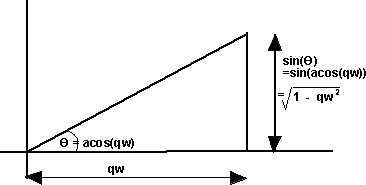
from above diagram this gives:
a1.x = q1.x / Math.sqrt(1-q1.w*q1.w)
simarly for y and z:
a1.y = q1.y / Math.sqrt(1-q1.w*q1.w)
a1.z = q1.z / Math.sqrt(1-q1.w*q1.w)
Issues
Example
| we take the 90 degree rotation from this: |
 |
to this: |
 |
As shown
here the quaternion for this rotation is: (0.7071+ i 0.7071)
So using the above result:
angle = 2 * acos(qw) = 2 * acos(0.7071) = 90 degrees
s = sqrt(1-qw*qw) = sqrt(0.5) = 0.7071
x = qx / s = 0.7071 / 0.7071 = 1
y = qy / s = 0
z = qz / s = 0
this gives the axis angle:
angle = 90 degrees
axis = 1,0,0
which agrees with the result shown here
Note:
- Most maths libraries use radians instead
of degrees (apart from OpenGL).
Angle Calculator and Further examples
I have put a java applet here which allows the values to be entered and the converted values shown along with a graphical representation of the orientation.
Also further examples in 90 degree steps here
This site may have errors. Don't use for critical systems.